

Overview
This prompt guides developers in creating a responsive Adsense Revenue Calculator Tool using HTML, CSS, and JavaScript. Programmers and web developers will benefit by enhancing their coding skills and creating a practical application.
Prompt Overview
Purpose: This tool calculates potential Adsense revenue based on user inputs.
Audience: It is designed for bloggers, website owners, and digital marketers seeking revenue insights.
Distinctive Feature: The tool features a responsive design and colorful styling for an engaging user experience.
Outcome: Users will easily estimate their Adsense revenue with a simple and interactive interface.
Quick Specs
- Media: Text
- Use case: Generation
- Industry: Content & Media Creation, Data & Analysis, Development Tools & DevOps
- Techniques: Prompt Templates, Structured Output, Zero-Shot Prompting
- Models: Claude 3.5 Sonnet, Gemini 2.0 Flash, GPT-4o, Llama 3.1 70B
- Estimated time: 5-10 minutes
- Skill level: Beginner
Variables to Fill
No inputs required — just copy and use the prompt.
Example Variables Block
No example values needed for this prompt.
The Prompt
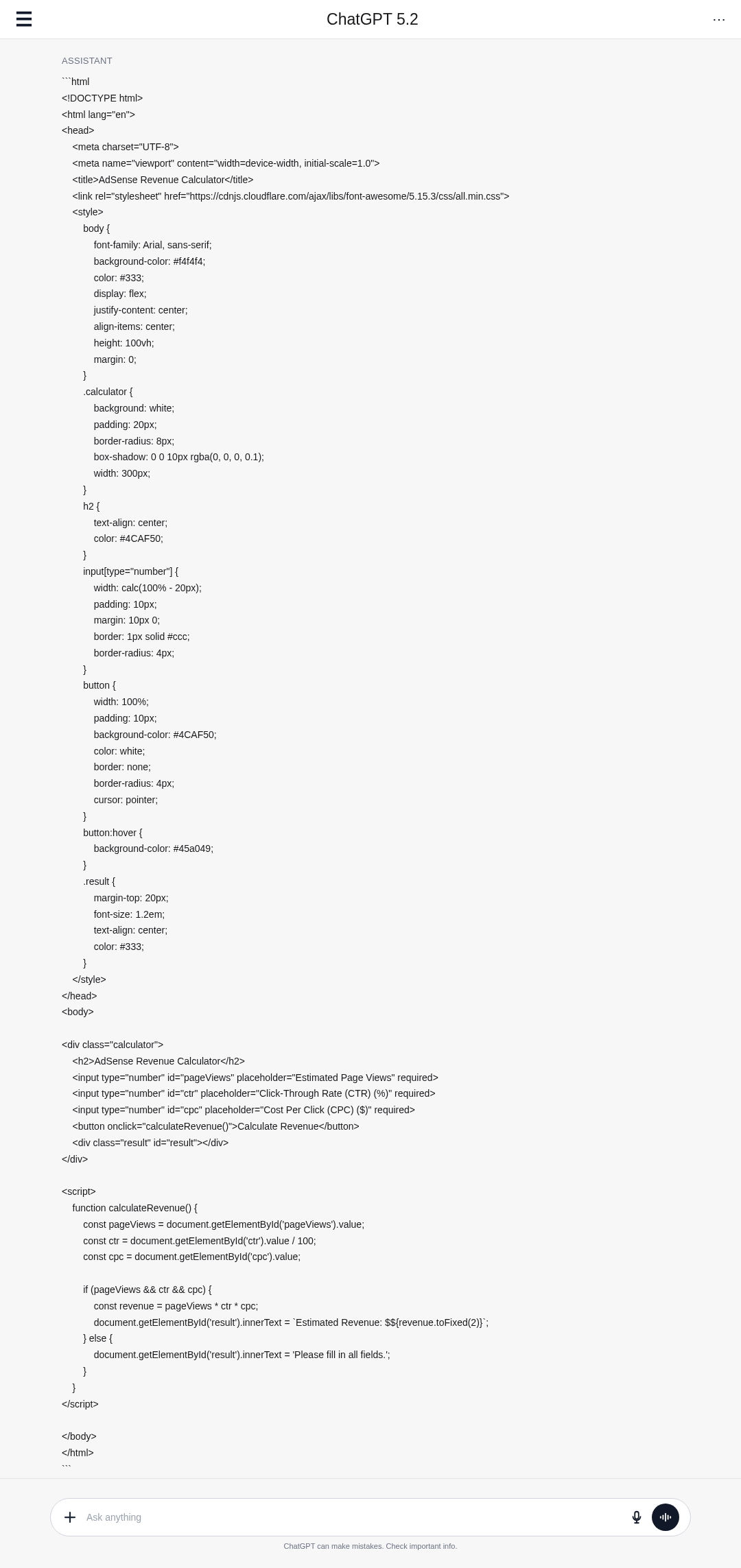
Develop a complete responsive Adsense Revenue Calculator Tool that includes the following features:
– Input fields for:
– Estimated Page Views
– Click-Through Rate (CTR)
– Cost Per Click (CPC)
– A button to calculate revenue.
– A display area for the calculated revenue.
Ensure the tool has colorful styling, utilizing any free libraries as necessary for enhanced functionality and design. The implementation should use:
– HTML for structure
– CSS for styling
– JavaScript for calculation logic
## Steps
1. HTML Structure:
– Create the layout with input fields for:
– Estimated Page Views
– Click Through Rate (CTR)
– Cost Per Click (CPC)
– A button to calculate revenue
– A display area for the calculated revenue
2. CSS Styling:
– Use CSS to style the tool, ensuring it is visually appealing and responsive.
– Consider using a CSS library like Bootstrap for grid and responsive design.
3. JavaScript Logic:
– Capture input values when the calculate button is clicked.
– Implement the formula to calculate revenue:
`Revenue = (Page Views * CTR * CPC) / 100`
– Display the calculated revenue.
## Output Format
The output should consist of the following files:
– An `index.html` file containing the markup.
– A `styles.css` file for styling, linked in the HTML file.
– A `script.js` file for the JavaScript logic.
All files should be included in a zip format, ensuring they are well-organized and easy to understand, with comments where necessary.
Screenshot Examples
▲ Collapse image
How to Use This Prompt
- Copy the prompt provided above.
- Paste it into your preferred code editor.
- Follow the steps to create HTML, CSS, and JavaScript files.
- Implement the features as described in the prompt.
- Test the tool for functionality and responsiveness.
- Zip the files and ensure they are well-organized.
Tips for Best Results
- Plan Your Layout: Start by sketching the layout of your calculator tool to ensure all elements fit nicely.
- Use Responsive Design: Implement CSS frameworks like Bootstrap to make your tool look good on all devices.
- Validate Inputs: Add JavaScript validation to ensure users enter valid numbers before calculating revenue.
- Test Thoroughly: After implementation, test the tool with various inputs to ensure accuracy and responsiveness.
FAQ
- What is an Adsense Revenue Calculator Tool?
It estimates potential earnings based on page views, CTR, and CPC inputs. - What inputs are required for the calculator?
You need estimated page views, click-through rate (CTR), and cost per click (CPC). - How is revenue calculated in this tool?
Revenue is calculated using the formula: (Page Views CTR CPC) / 100. - What technologies are used to build the tool?
The tool uses HTML for structure, CSS for styling, and JavaScript for logic.
Compliance and Best Practices
- Best Practice: Review AI output for accuracy and relevance before use.
- Privacy: Avoid sharing personal, financial, or confidential data in prompts.
- Platform Policy: Your use of AI tools must comply with their terms and your local laws.
Revision History
- Version 1.0 (February 2026): Initial release.
