

Prompt overview
-
Purpose: Enable marketers and business owners to design, promote, and run webinars that spotlight product value, maximize attendance, and drive qualified leads.
-
Audience: Entrepreneurs, sales teams, marketing managers, SaaS leaders, coaches, B2B/B2C brands.
-
Distinctive feature: Combines dependency grammar structuring, actionable promotion, and conversion-optimized follow-up workflow.
-
Outcome: A cohesive strategy for webinar content, marketing, and follow-up—all tailored to your audience and goals.
Quick Specs
- Media: Text
- Use case: Content Creation, Content Strategy, Generation
- Industry: Marketing & Sales
- Techniques: Output Constraints
- Models: Claude 3.5 Sonnet, Gemini 2.0 Flash, GPT-4o, Llama 3.1 70B
- Estimated time: 10-20 minutes
- Skill level: Intermediate
Variables to fill
-
Target audience: [INSERT TARGET AUDIENCE]
-
Product/service: [INSERT PRODUCT/SERVICE]
-
Unique selling points: [INSERT UNIQUE SELLING POINTS]
-
Industry: [INSERT INDUSTRY]
-
Company background: [INSERT COMPANY BACKGROUND]
Example variables block
-
Target audience: “Mid-sized SaaS companies in US, IT managers & decision makers”
-
Product/service: “Steal Prompt AI Library”
-
Unique selling points: “Largest variety of AI prompts, easy integration, flexible use cases”
-
Industry: “Technology, SaaS”
-
Company background: “5 years in AI prompt innovation; trusted by 3000+ clients”
Prompt template
Adopt the role of an expert webinar host and lead generation specialist. Organize and present a high-impact webinar showcasing {Product/service} for [Target audience] in the [Industry]. Highlight unique selling points and company background. Use dependency grammar to structure all content.
Provide headings, subheadings, and bullet points for every detailed step.
**Inputs**
– Target audience: [Target audience]
– Product/service: {Product/service}
– Unique selling points: [Unique selling points]
– Industry: [Industry]
– Company background: [Company background]
**Process**
1. Develop webinar content highlighting the core value of the product/service.
2. Create promotional materials to maximize registration and attendance.
3. Plan conversion-focused follow-up communications (email sequence, CTAs, gated content).
**Output format**
Structured headings and subheadings; bullet points beneath each for detailed tactics.
Sample Output
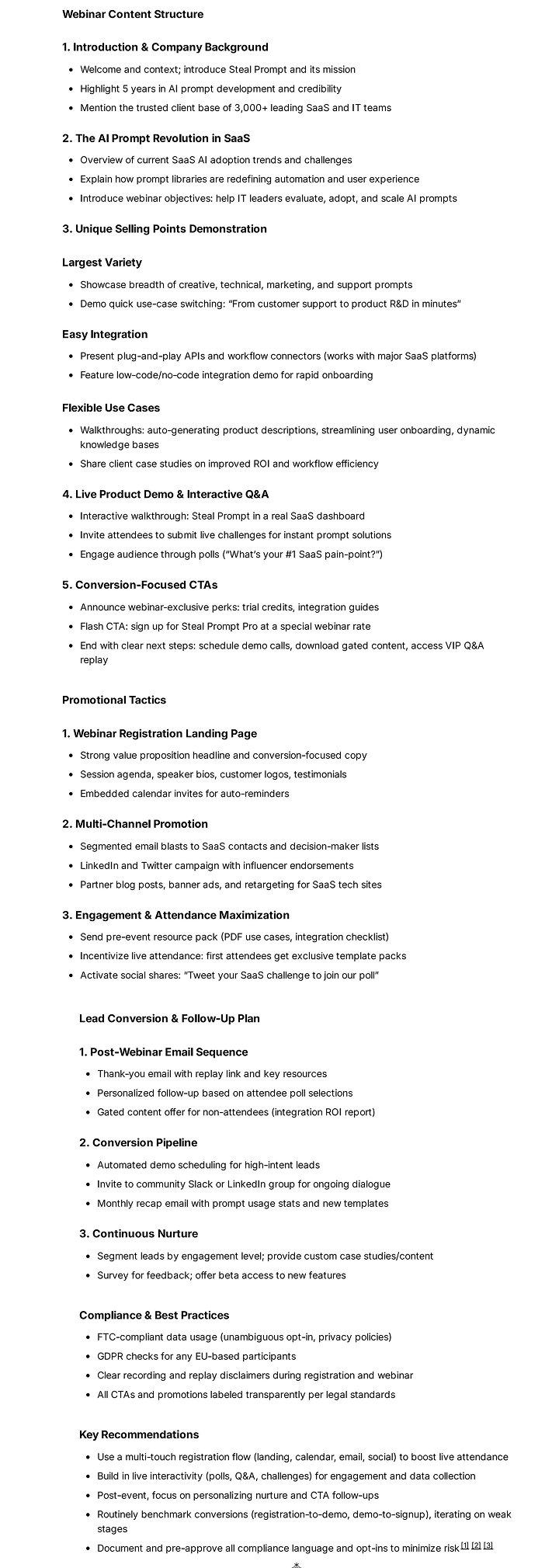
How to use
-
Insert your specific product and campaign details in the template.
-
Fill each subheading with customized content and examples.
-
Share with your marketing or event team.
-
Deploy the strategy and measure lead conversion post-webinar.
FAQ
Q: What topics most effectively engage webinar audiences?
A: Solutions to unique pain points, live product demos, expert Q&As, or case studies are most impactful.
Q: What’s the best follow-up sequence after a webinar?
A: Send a thank you email, value-packed resources, and a personalized CTA within 24–48 hours to maximize conversions.
Q: How do I maximize attendance?
A: Use branded email sequences, social ads, partnerships, and reminder messages before the event.
Compliance and notes
-
Ensure all attendee data is collected and managed under GDPR, CAN-SPAM, and local privacy laws.
-
Include opt-out options and privacy notices in registration and follow-up emails.
-
Avoid exaggerated claims; accurately describe product/service capabilities.
Revision history
-
v1.0 – Webinar strategy prompt template for lead generation – 2025-10-25
